Why the Importance of Technology in Early Childhood Education Might Be More Critical Than You Think
Is technology in early childhood education helping or hurting? Dive into the digital vs. traditional learning debate, find the most researched and best apps and tools for preschoolers, and get real-life solutions to common tech challenges!
As a teacher and aunt, I’ve seen first-hand how both digital and traditional learning methods shape early education. My nieces, who are 3 and 5, are the perfect examples of how the blend of technology with hands-on activities can help little learners. But, with so many options out there, what’s best for them?
I’ve often found myself pondering this question, trying to balance their screen time with activities like coloring, building with blocks, and reading their favorite storybooks. But here’s the deal: the importance of technology in early childhood education is undeniable when it’s used in moderation, and with the right resources.
I’ve previously discussed online games for ESL students and how beneficial they are for learning language, but did you know that research suggests that mainstream students also benefit from a ‘mental break’ to joint classroom or homeschool digital games?
When my 5-year-old niece first got her hands on a tablet, it felt like a battle between old-school toys and shiny, tempting screens. She’d often get frustrated when games didn’t respond the way she expected or when apps seemed too complicated. It took some trial and error to figure out how to integrate technology in a way that was both fun and educational.
I quickly learned that it wasn’t about banning screens (I am a big advocate for hands-on playful learning) but about choosing the right apps and devices that support her learning style.
I found that combining traditional play (like puzzles or storybooks) with digital learning (apps and educational games) helped her focus better and enhanced her problem-solving skills.

I used a mix of both approaches and slowly introduced a few tech gadgets that I read and researched were great for early learners. Below are some of the devices and apps I’ve tried out, and the ones that really worked wonders for my nieces:
Note: The links below are affiliate links, which means I may earn a small commission if you make a purchase through them at no extra cost to you. I only recommend products that I personally use or believe will benefit you and your child.
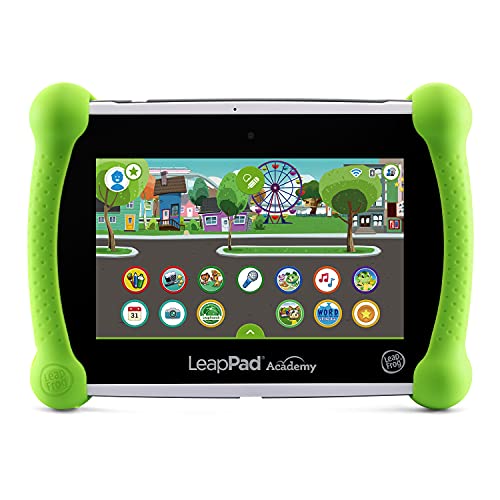
1. LeapFrog LeapPad Academy Learning Tablet
This tablet is a game-changer! It’s packed with educational games, apps, and even videos designed to teach everything from math to reading. It’s super user-friendly and kids loved the engaging characters that came with each lesson. I worked at a school that had several of these in the library.
Click here to check it out on Amazon!
Benefit:
This device boosts their creativity and cognitive skills, helping them understand letters, numbers, and shapes through interactive games. It’s also easy to carry around, which is perfect for long car rides or waiting at appointments.
2. LeapFrog 2-in-1 LeapTop Touch
This laptop is a fun, interactive way to introduce children to basic computing. It has a touch screen and a keyboard for children to practice typing and letter recognition. I use it within centers too, the library has this one on request.
If you’re working with special needs kids, it’s perfect for non-verbal children, you can assess whether they understand which letter you are referring to simply by watching them type the letter.

Click here to check it out on Amazon!
Benefit:
It helps kids build early skills such as letter and number recognition, problem-solving, and even basic computer skills—all while having fun!
3. QuTZ Talking Phonics Flash Cards
These flash cards are a great tool to practice phonics. They provide auditory feedback and colorful images to keep kids engaged.
The auditory feedback is especially critical for my nonverbal students. It helps them identify the sounds and eventually produce the sounds. I am also always constantly using them with my ELL students, differentiating my lessons to help accommodate newcomers is a daily task.

Click here to check it out on Amazon!
Benefit:
They make learning phonics fun and interactive! Kids can hear the sounds and repeat them, which improves their vocabulary and pronunciation.
4. TimingSXD Kindergarten Learning Flashcards
These cards cover a variety of early learning concepts, such as colors, shapes, and numbers. I add them to Tuff Trays sometimes with some sensory materials.
No products found.Click here to check it out on Amazon!
Benefit:
They help reinforce basic concepts in a simple and visual way. The images and engaging learning style help the kids learn quickly!
In conclusion, the key is balance. Technology can be a wonderful tool for learning when used appropriately, but it’s crucial not to rely on it exclusively. Combining digital with traditional learning methods helps preschoolers thrive. By carefully selecting the tools that match your child’s learning needs, you can create a fun, educational environment.

What tech tools do you use in your home or classroom? Let me know in the comments!