Welcome! This page is meant to answer some of the most common questions that we receive relating to printing & accessing the printables on this site.
If your question or problem is not answered by this list, please email us at yara@seaofknowledge.org.
I subscribed but haven’t received my Free Download.
First, you will get an email to confirm your subscription. It may take up to 10 minutes to receive this email. Please check your spam folder, promotions folder, etc. After you confirm your subscription, you will receive your link to confirm and download your free printable. Please note that some email services have been known to block certain emails, mistaking them for spam. Please add yara@seaofknowledge.org to your address book/contacts and this should help get the emails through.
Why does clicking a free link sometimes take me to a payment page?
Great question. So here’s the deal. Many of my printables live inside larger bundles or collections that I offer as a one time payment. When you click a link on my blog and then enter your email and name in the form, you might land on the page for that full bundle, because that’s where the printable also lives.
But the specific freebie you signed up for will still be delivered straight to your inbox. Make sure to check Spam, Promotions, or your Other folder too. Some email elves love hiding things.
I signed up but can’t find my free printable. Where is it?
It’s definitely on its way to you. If you don’t see it in your main inbox, it usually means it slipped into Spam, Promotions, or the Other tab. Peek in there and it should be waiting for you. And then MOVE it to inbox and add me to contacts yara@seaofknowledge.org so that you don’t miss any future printables.
Do I have to pay for the freebie?
A: Nope. Never. The freebie you signed up for is sent at no cost to you — always. Even if the printable is part of a bigger paid bundle on my site, the free version still arrives in your email.
Can I message you if I don’t see the freebie?
Of course you can reach out kindly, but please keep in mind: I send these printables to support teachers and parents, and they take time and love to create. They are free, and they do get delivered.
What I kindly ask is that you avoid sending angry or abusive messages through my blog or email. I’m just one human trying to help, and I want this space to stay positive and supportive.
What’s the best way to make sure I get all future freebies?
Easy.
Add my email to your contacts.
Open my messages whenever they arrive and be sure to click around (those are the things that help keep my blog afloat and keep making you and sending you freebies).
And check those side folders if something goes missing.
Do that, and you’ll never miss a new printable again.
I am a current subscriber. How do I access the subscriber’s page?
I used to have a subscriber’s specific page, however I have discontinued that at the moment.
I am a current subscriber but have not been receiving the weekly newsletter.
Some email services have been known to block certain emails, mistaking them for spam. Please add yara@seaofknowledge.org to your address book/contacts and this should help get the emails through. If you have an alternate email address, you can try subscribing again using that address. We do not recommend AOL or Hotmail addresses as these have been known to incorrectly block valid emails from coming through.
How do I download the files?
The activities that are available for free to everyone can be downloaded via a text link near the bottom of each post. The text link will say something like “Click here to Download your Free Apple Number Puzzles”, for example.
Some of the downloads will include a form to sign up so the printable can be sent to you via email. The form will be visible and usually under the picture of the printable. It will also include the name of the printable on the form.
If you can’t see the form, you will most likely see this image where you can click on it to get directed to the form:
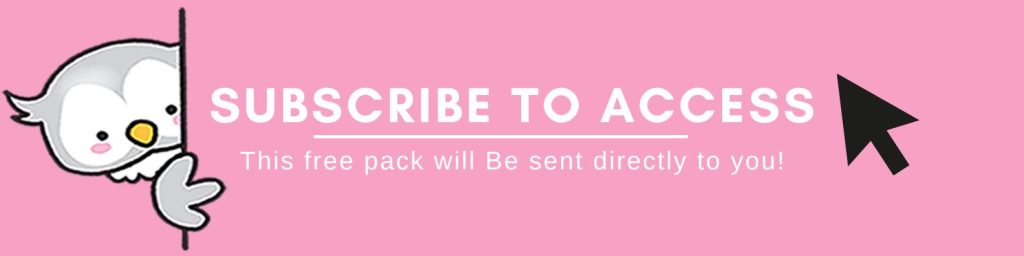
Once you have signed up, the email will include a “confirm your subscription button” and then the file will instantly download to your computer or directed to it to Google Drive and you can then save it to your computer or print it from your browser. (We recommend saving it to your computer first, then opening it up in Adobe Reader to print it).
Another way some of our posts are locked, is via this sign up locker, see the example below:
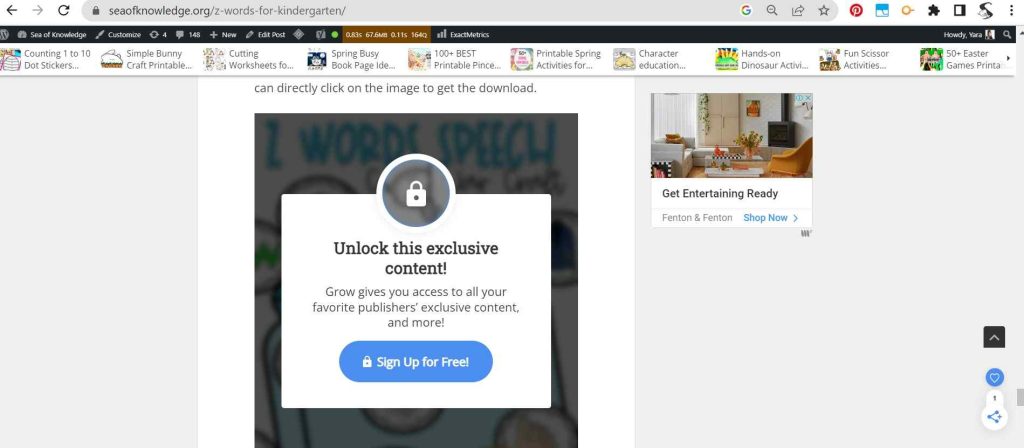
This sign up is super simple. Usually the image that is locked will have a link attached to it. So all you will need to do is simply sign up for free and click on that big blue button that says “sign up for free’ to unlock that image.
Then come back to that page and click on that same image and you will be directed to the printable download on Google Drive.
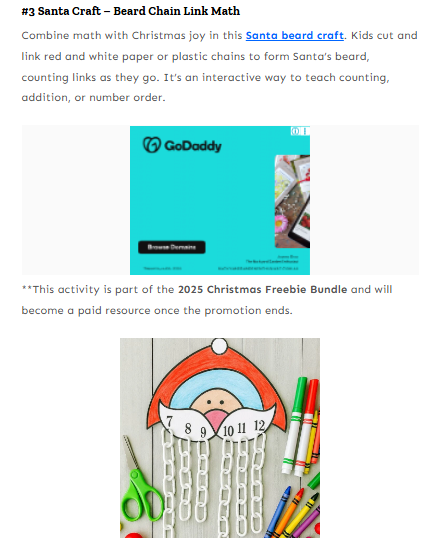
Another way to see a printable linked, is inside a longer article with a round up of activities, it will usually be linked in the first paragraph, like this below. The “Santa Beard Craft” is linked in blue inside the paragraph, it will include a picture inside the roundup below and then potentially an ad, check out the screenshot:
My child/children are X years old. What activities are appropriate for their age?
Please keep in mind that all children develop at different rates. You can browse through our toddler, preschool and kindergarten categories to find suggested activities.
What kind of teacher printable downloads can I find on this site?
You can find a variety of teacher printable downloads such as worksheets, lesson plans, activities, graphic organizers, posters, flashcards, and more.
Are the downloads free, or do I have to pay for them?
These printables are completely free. A sign up is usually required to access most of the printables.
What is the best way to save ink when printing so many pages?
If printing an entire pack or many activities, we recommend selecting the “draft” quality under your printer properties. You should test it out first with a few pages to make sure you like it because the image quality is lower but it also uses a lot less ink.
You can also save ink by printing 2 or 4 pages on one to save ink and paper.
I click on the file link and see a blank page/ there are pages missing/ nothing happens.
If you click on a file link and see a blank page, or if there are pages missing or nothing happens, there are a few things you can try:
- Check your internet connection: Make sure that you have a stable internet connection and that your browser is up to date. A slow or unstable internet connection can cause problems with downloading or viewing files.
- Clear your browser cache: Sometimes your browser’s cache can become corrupted, which can cause problems with downloading or viewing files. Clearing your cache can often solve these issues.
- Try a different browser: If you’re having trouble with one browser, try using a different one to see if the problem persists. Different browsers can sometimes have different compatibility issues with certain file types.
I printed an activity and some content around the edges was cut off.
Be sure to open the downloads on desktop and not on your phone or tablet. Please make sure you select the “Scale to Fit” or “Fit to Print” option when printing so that nothing gets cut off.
The file says it’s editable but I can’t edit the forms or the text.
Be sure to open the downloads on desktop and not on your phone or tablet. Editable files are usually made in Adobe Reader DC.
NOTE: not ALL images in the file contain editable text, some name activities for example, include pieces where you can add the letters yourself with a marker.
Please be sure you have Adobe Reader DC installed (the free version). Then right click and open with >> Adobe Reader DC.
The forms should be visible to you to be able to edit now.
How often are new printables added to the site?
We add materials every week and on most days of the week. So check back regularly for new and seasonal items.